 VesselTill
01
Open your POS.
Use your phone, tablet or computer. Choose your currency and add your business details when you’re ready.
A vessel for every seller
Turn your phone, tablet or computer into a free, offline-first till / POS for your shop, stall or café — no account needed.
No sign-up. No card. The core POS is free forever.
Use your browser or get the Windows app ↗
A full POS. Not a free trial.Stock, orders, receipts and reports included.
Free forever coreNo monthly fee to sell
No loginOpen it and get started
Works offlineLoad and install it first
Your data, your deviceBackups are yours to keep
01 / Get going
No new hardware bundle. No account to create. Just a browser and something to sell.
Use your phone, tablet or computer. Choose your currency and add your business details when you’re ready.
Add products by hand or upload an Excel list. Names and prices are enough; stock, categories and barcodes are optional.
Tap or scan items, record cash, card, split or a QR payment, then share a receipt on WhatsApp, save a PDF or print it.
Keep your own card machine or payment QR provider. VesselTill records payments; it doesn’t process them or take a cut. Your provider’s fees still apply.
02 / A working day, covered
The things you need between opening up and counting the cash. Included in the free POS.
Your business name, logo and details. Send it on WhatsApp, save a PDF, print or share it through your device.
A proper record of every sale
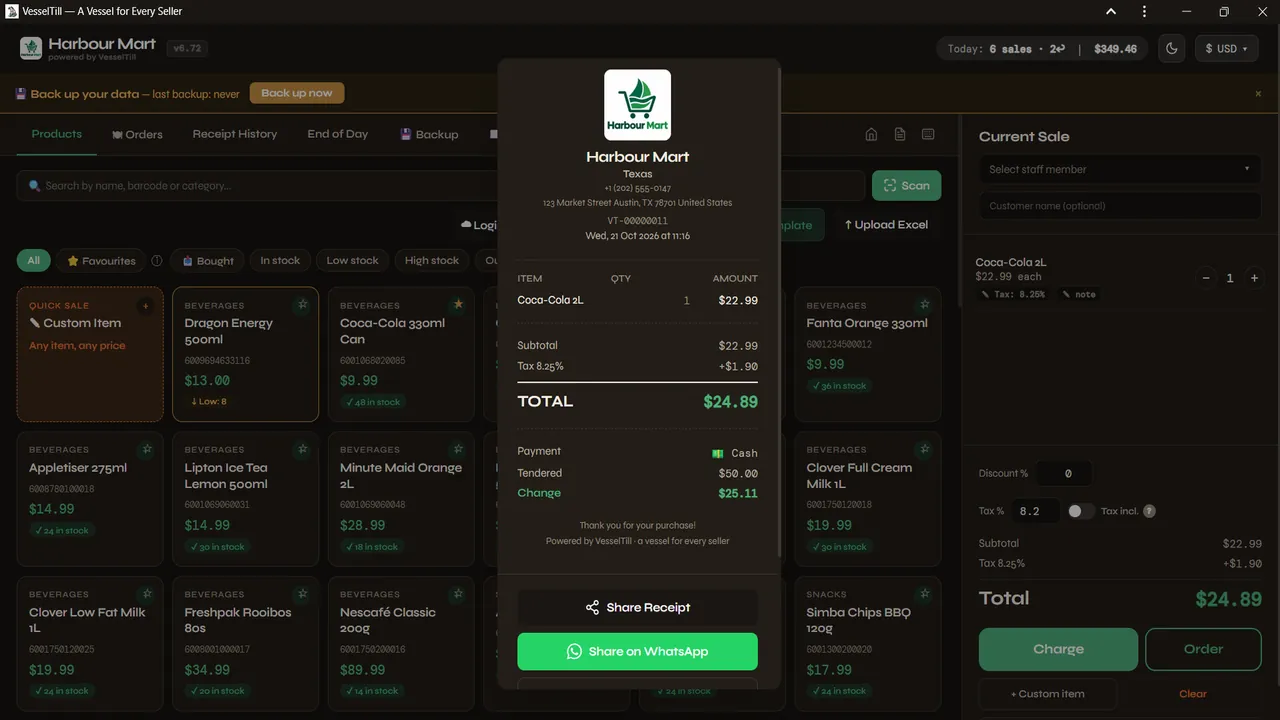
Real app receipt · tap for the full screen
Track stock as you sell, spot low-stock items and adjust quantities when a delivery arrives. Returns put stock back.
Stock & product management
Save a table or name, add item notes and take payment later. Print kitchen tickets on 80 mm or 58 mm paper.
Cafés, kitchens & takeaways
Find the receipt, record a refund or exchange, or void a sale with a reason. Voided receipts stay in a restorable bin.
Returns & an audit trail
Review sales, returns, tax and staff breakdowns. Cash up at the end of the day and keep a PDF or email report.
Reports & cash-up
More than one screen? Customer, Kitchen and Pickup displays open in extra windows on the same device for a second monitor. They aren’t a remote link to another POS device. See display setup.
See what you’ll use
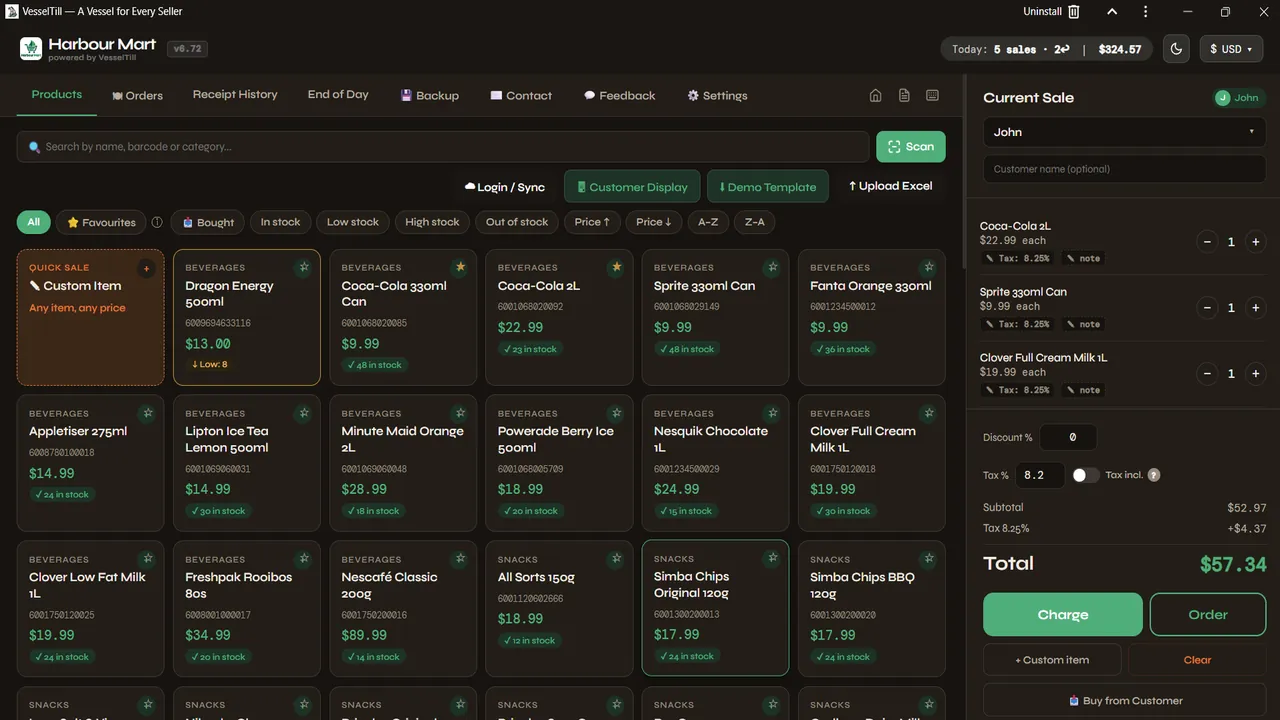
These are actual app screens, not a concept mockup. Example products and figures are for illustration.
Tap products or scan a barcode. Your current sale stays beside the catalogue.
Try it for yourself →03 / Built around your counter
Load the app online and install it first. Then your POS, stock, orders and reports can keep working without a connection. Check offline reopening on your device before your next market day.
Your products and sales stay in this browser on this device. There’s no VesselTill server holding your shop’s sales data.
Get ready for offline selling →Local isn’t the same as backed up. Clearing browser storage or losing the device can lose your data. Keep off-device backups. Drive backup and online sharing need internet.
04 / Small business, big working day
A market table. A neighbourhood shop. The café you finally opened. Start with the device you already have.
Travel light. Sell offline and share receipts when you’re connected.
Tap fast-moving products, scan barcodes and see what needs restocking.
Keep orders, notes and kitchen tickets together until it’s time to pay.
Record items bought from customers, with a purchase note and stock entry.
05 / Simple, honest pricing
Everything you need to sell on one device is free forever. Only pay if you want the extra backup and multi-device features.
The place to start
$0 / forever
One device. Your shop. No account, ads or subscription.
No trial countdown. No card required.
Optional recurring upgrade
$6 / month
Or $60/year. Back up to your own Drive and review more POS devices.
14-day trial, no card for eligible users. Google sign-in required. White label is not included in the trial. Cancel any time.
Limited / Founding Member
$50 / one-time
Lifetime VesselTill Sync. No monthly or yearly renewals.
0of 0 spots left
Limited, numbered spots. Each one gets its own Founder number.
Already subscribed? Cancel your existing Sync subscription first. *Lifetime means for as long as Sync is offered, with at least 90 days’ notice if it ends. Read the details.
More POS devices ≠ shared live stock. Each device keeps its own stock and orders. All tills is a read-only summary of uploaded information, not live inventory or order sharing.
You keep the free POS. If a trial or paid plan ends, local selling and file backups stay available. Sync billing is handled by Polar. Review current terms in the app before paying.
Built by a retailer
Lourens De JagerFounder, VesselTill
Potchefstroom, South Africa
“Why doesn’t a POS exist that you can simply open and use?”
After more than 14 years in retail, I’d seen how much got between small sellers and a simple sale: accounts, subscriptions, hardware lock-in. I built VesselTill as a self-taught developer while living in a shelter, because starting small shouldn’t mean getting left out.
A vessel for every seller. That’s the idea.
06 / Before you open
Want the step-by-step version? The help guide is searchable by task, from your first sale to your next backup.
Find it in the help guideA POS (point of sale) is what you use to ring up a sale and keep a receipt. You might call it a till, cash register or register. VesselTill (sometimes written Vessel Till) runs in a browser on your phone, tablet or computer.
Yes. The single-device POS is free forever: no account, subscription, ads or VesselTill transaction fees. Stock, orders, receipts and reports are included. Sync and Founding Member are optional paid extras, not a requirement to sell.
No account, email address or bank card is needed for the free POS. Only optional Sync uses Google sign-in. Eligible users can try Sync for 14 days without a card; one trial per Google account and device.
Load the app online first and install it for regular use. Selling, local stock, orders, receipts and reports can work offline after the app is available on your device. Google sign-in, Drive backup and online sharing need a connection; your payment provider may need one too. Check offline reopening on your own device before relying on it.
No. VesselTill records how the customer paid. Use your own card terminal or payment provider, or show a QR code from that provider. Confirm the payment there before recording the sale. VesselTill takes no transaction fee; your provider may charge its own fees.
Yes. Save an order with a table or name, item notes and a kitchen note; add to it and take payment when ready. Print kitchen tickets for 80 mm or 58 mm thermal paper. Orders only become sales once paid. Customer, Kitchen and Pickup displays open as local windows on the same device for a second monitor; they are not remote pairing between devices.
Products, sales and settings are stored on your device in the browser. Keep dated Full Backup files somewhere separate from the POS device. Clearing browser storage or losing the device can lose local data, including local recovery points. Optional Sync saves backups to your own Google Drive; VesselTill’s servers keep a small account and plan record, not your sales or products.
No. Each POS device keeps its own stock, sales and orders. Sync adds Google Drive backup and restore, plus a read-only All tills view of uploaded summaries. Those summaries can be out of date if a POS device has not uploaded. Standard Sync supports up to 3 POS devices on one Google account; Founding Member supports up to 5.
It is a limited $50 one-time purchase for lifetime VesselTill Sync, up to 5 POS devices, white label and a numbered Founder badge. There is a 14-day refund; a full refund ends membership. Lifetime means for as long as Sync is offered, with at least 90 days’ notice if it ends. Already subscribed? Cancel the existing Sync subscription first, then return while spots remain. The pricing card above shows how many spots are left; check the terms in the app before paying.
Yes. Open Sync in the app and choose Manage or cancel subscription to open Polar. You can cancel there; Sync stays available until the end of the period you paid for. The free local POS and your local data remain. White label is included with paid Sync, not its free trial.
Because running your shop never needs one. Sync is only for sellers who want Google Drive backup and more POS devices. The free POS works the same with or without it, and stays free.
Use a browser on a phone, tablet or computer, and install it as a PWA. A Windows app is also available in the Microsoft Store. The POS supports 57 currencies and menus in English, Español, Deutsch and Filipino, with English as the fallback. Currency selection is not foreign-exchange conversion.
A USB barcode scanner can type codes into search; phones can also scan with the camera. Receipts and kitchen tickets use your device’s normal print window, so a printer must already work with that device. There is no direct Bluetooth or ESC/POS printer connection. Receipts can also be saved as PDFs or shared on WhatsApp.
Follow the VesselTill WhatsApp channel, or tap the version badge at the top of this page to see what’s new.
07 / A real person behind the software
A question, a bug or something that would make your day easier? Every message goes to the founder.
Follow updates on WhatsApp ↗For instructions, try the help guide first. Please don’t send customer records, card details or a shop backup in this form.
Your counter is ready
No account. No sales pitch. Just open your POS.
Open free till / POS Free core forever · Optional Sync only if you need it