 VesselTill
Offline selling
How to run a till with no internet (free offline POS)
To run a till with no internet, use a till app that saves itself on your device. Open VesselTill once while you are online, add it to your home screen, then test it in airplane mode. After that you can sell, track stock and save receipts with no signal. Back up often, because the sales live on that device.
Why offline matters
A till that needs the internet stops when the internet stops. For many small sellers that happens often:
- Power cuts and load shedding. When the power is off, the Wi-Fi router goes off too, and mobile signal can get weaker.
- Markets, fairs and events, where many phones share one weak signal.
- Data costs. A till that loads everything from a server uses data on every sale.
- Rural areas and basements with patchy coverage.
An offline till keeps the queue moving. You do not have to write sales on paper and type them in later.
How an offline POS system works
An offline point of sale (POS) system is a till that keeps selling when the connection drops. With VesselTill, which is free offline POS software, there are two parts, and neither needs a server once it is set up:
- The app saves itself on your device. The first time you open VesselTill online, your browser keeps a copy of the app. Next time, it opens from that copy, with or without signal.
- Your sales are saved on the device. Every sale, product and stock count goes into the browser’s storage on that phone, tablet or computer. Nothing waits for an upload.
When the internet comes back, only the online extras carry on: sharing a receipt on WhatsApp, emailing a report, or backing up to Google Drive with Sync.
How to make your till work offline: four steps
1. Open VesselTill once while you are online
Open vesseltill.com/pos in the browser you will use for selling and leave it open for a minute.
2. Check that it is ready
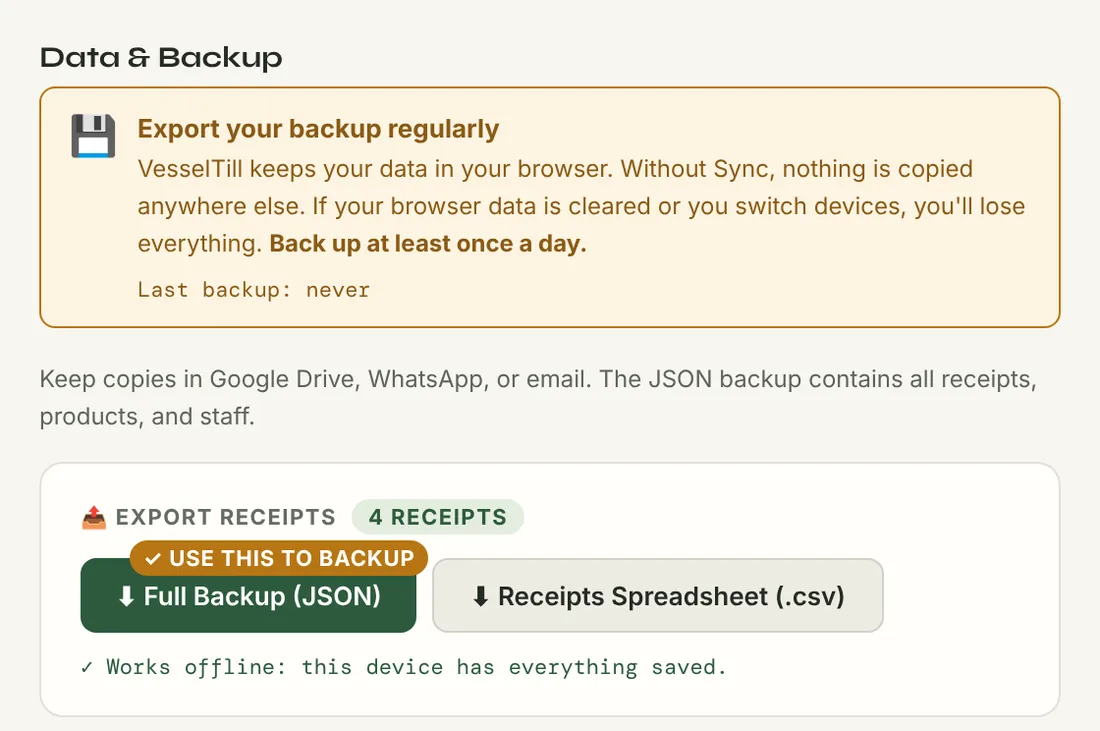
Open the 💾 Backup tab. Under Export Receipts, VesselTill tells you whether this device is ready. You want to see: “✓ Works offline: this device has everything saved.” If it says it is not ready yet, stay online for a minute with VesselTill open, then reopen it.
3. Add it to your home screen
- Android (Chrome): tap Install on the banner, or the Install App button at the top of the till.
- iPhone or iPad (Safari): tap the Share button, then Add to Home Screen.
- Windows: get the VesselTill app from the Microsoft Store.
- Computer (Chrome or Edge): click the install icon in the address bar.
The help guide on installing has more detail for each device.
4. Test it in airplane mode
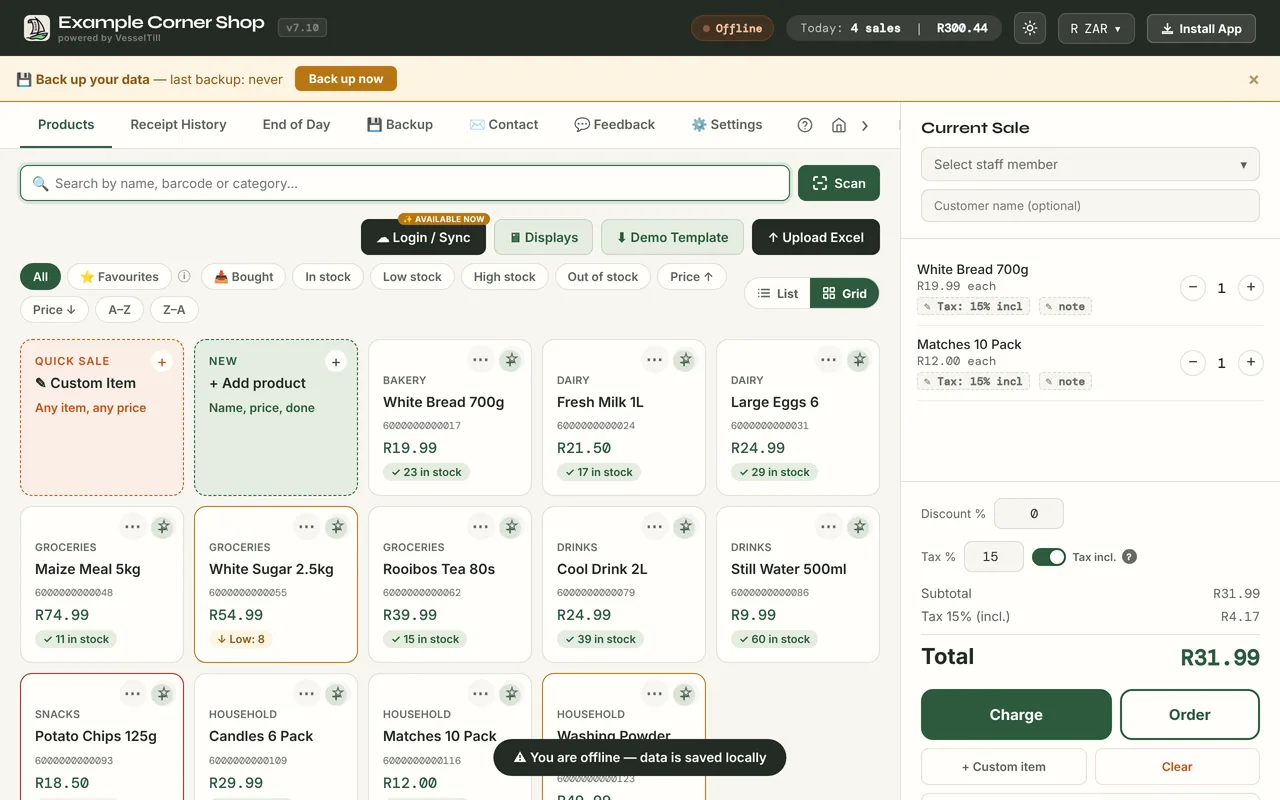
Turn on airplane mode, close VesselTill completely and open it again from the home screen. The till should open and show Offline at the top. Ring up a test sale, then void it from Receipt History so it does not count. Do this before your next market day, not during it.
Things to watch out for
Clearing browser data deletes your sales
Because your records live in the browser, clearing that browser’s data (or its “site data” or “cache and cookies” for VesselTill) can delete them. So can uninstalling the browser or losing the phone. Download a Full Backup (JSON) from the Backup tab at the end of each day and keep it somewhere else: your Google Drive, email, or a WhatsApp message to yourself. Never clear browser data to fix a problem without a backup.
Use one tab per till
VesselTill works in one tab or window at a time on each device. Two tabs selling at once could give two sales the same receipt number or count stock twice. If you open it a second time, the new tab shows a Use VesselTill here button. Finish any sale first, then tap it to move the till to that tab.
The same browser, every time
Each browser, and each browser profile, has its own storage. If you sell in Chrome, keep selling in Chrome on that device, or you will see an empty till.
Some things still need a signal
Sync needs internet to back up to Google Drive, but the till keeps selling while it waits. Your card machine or QR provider may also need its own signal, so check with your provider. Always confirm a card or QR payment on the provider’s side before you confirm the sale.
Want to see what else the free till does? Read the free till app guide or how VesselTill works. Troubleshooting is in the help guide.
Questions
Does VesselTill work during load shedding?
Yes, as long as your device has battery and VesselTill has been opened online on it before. Selling, stock, receipts and reports work without internet. Sharing on WhatsApp and Google Drive backup wait until you are back online.
What happens if I lose signal in the middle of a sale?
Nothing changes. The sale is saved on your device, so you can finish it as normal. If the customer pays by card or QR, make sure the payment went through on your provider’s side before you confirm.
Do I need to install anything to use VesselTill offline?
No download is required. Open it once online in your browser and it saves itself. Adding it to your home screen, or using the Windows app, makes it easier to open when you have no signal.
Can I lose my sales data?
Yes, if the browser’s data is cleared or the device is lost, because the records are stored on the device. Download a Full Backup file regularly and keep it somewhere else, or use Sync to back up to your own Google Drive.
Why can’t I use VesselTill in two tabs at once?
Two tabs selling at the same time could give two sales the same receipt number or count stock twice. VesselTill works in one tab at a time per device, and a second tab offers a Use VesselTill here button to move the till.